Documentation
TunnelTug scales from a local development tunnel to geo-distributed anycast production ingress — with multi-PoP site config, product stacks, meshTLS operator faces, kernel real-time replication, QUIC/HTTP/3, k3s fleets, and an OCI hub.
Day-2 procedures: docs/playbooks (ACME, vhosts, fleets, hub/stack, mesh, anycast, diagnostics).
How it works
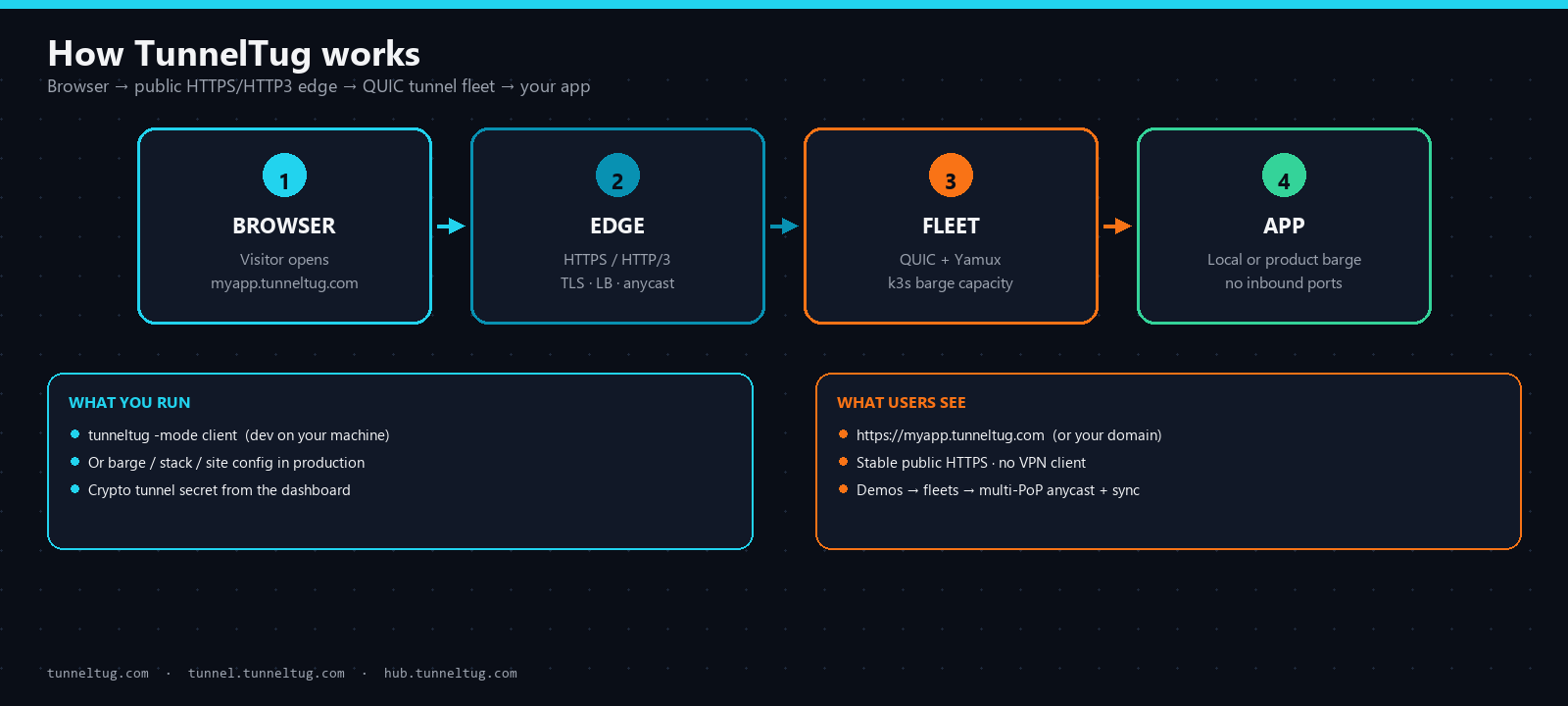
Visitors hit a public HTTPS/HTTP3 edge. TunnelTug carries the request over a QUIC control tunnel (Yamux streams) to your laptop in development, or through load-balanced barge fleets, product stacks, and anycast edges in production.
Platform layout
Public face on tunneltug.com, control at tunnel.tunneltug.com, images at hub.tunneltug.com. Private mesh names use *.tunneltug.tunnel when -mesh is enabled. Operator auth and shell use meshTLS FQDNs.
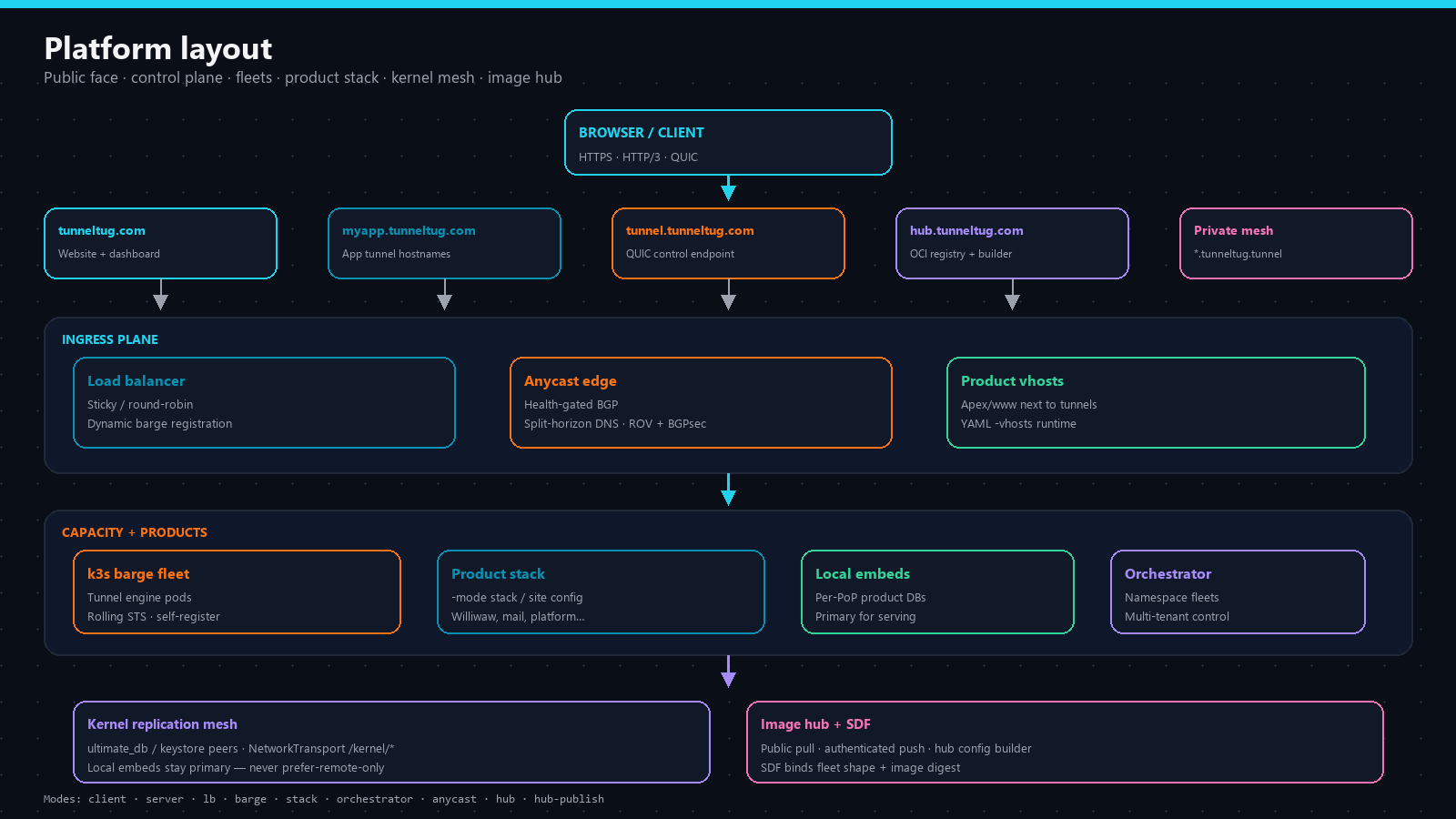
- tunneltug.com — product website and operator dashboard.
- myapp.tunneltug.com — application tunnel hostnames.
- tunnel.tunneltug.com — QUIC control endpoint clients connect to.
- hub.tunneltug.com — OCI registry + config builder for engines and services.
- Tunnel fleets — multi-server capacity behind a load balancer (k3s barges).
- Product stack — k3s Deployments from hub images; gateway + optional hostPort.
- meshTLS face — Mesh CA HTTPS for WebAuthn/DBSC and stack shell (not localhost).
- Anycast edges — geo-distributed production ingress with health-gated BGP.
- Kernel mesh — real-time service data replication across PoPs (local embeds stay primary).
Modes
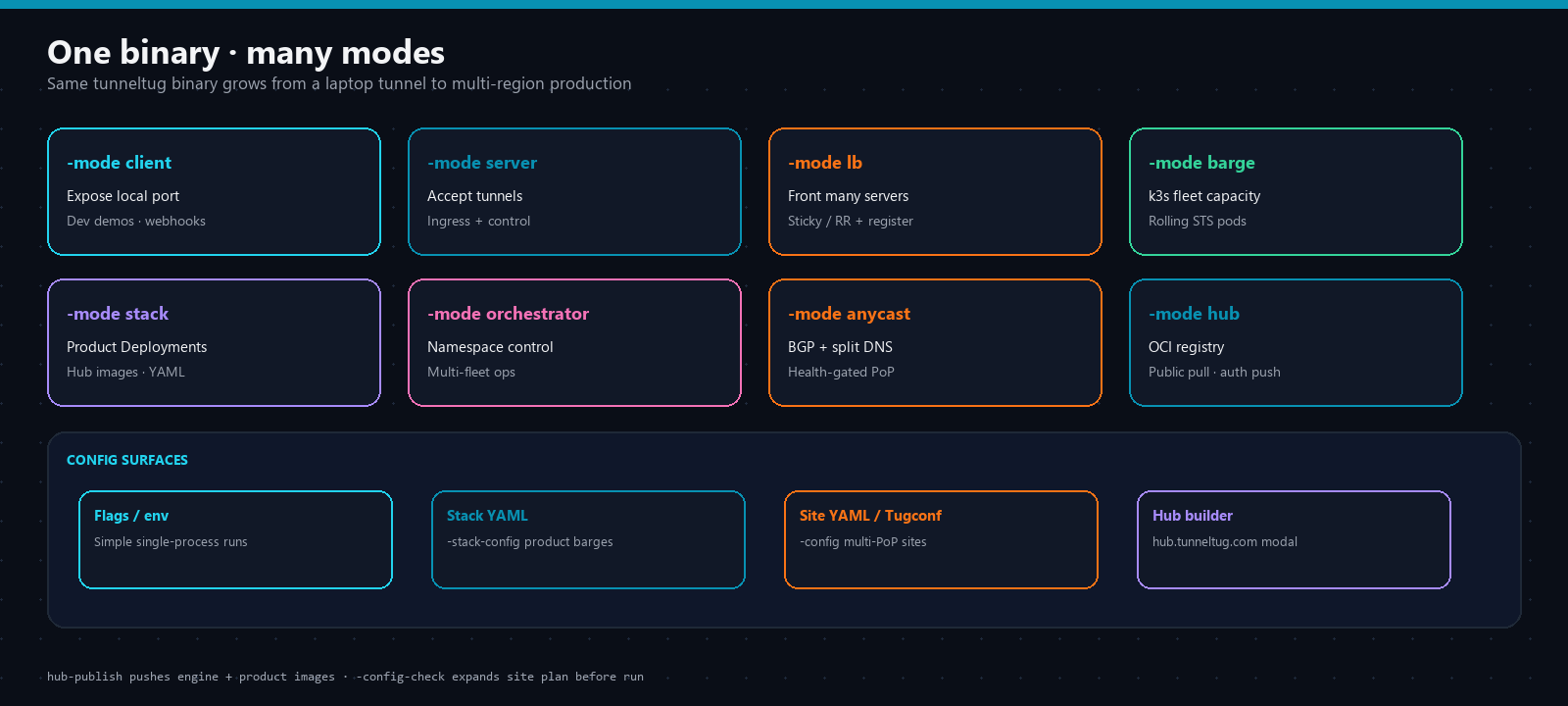
One binary, many operating modes. Pick the mode that matches where you are on the journey from demo to global production.
client
Expose -local as a public subdomain (or mesh host).
server
Accept tunnels and serve public ingress (or backend behind LB).
lb
Front many servers; sticky or round-robin + dynamic barge registration.
barge
Fleet of server backends — k3s by default; process for local dev.
stack
Self-contained k3s product Deployments from hub images (no kubectl).
orchestrator
Namespace-aware control + ingress for multi-fleet ops.
anycast
Split-horizon DNS + health-gated BGP announce/withdraw.
hub / hub-publish
OCI registry face; push engine + product images with a crypto token.
ultimate_db / keystore
Kernel replication barges for multi-PoP service data peers.
Client (development)
Sign in on the dashboard, copy your tunnel secret, then run:
tunneltug -mode client \\
  -server tunnel.tunneltug.com \\
  -domain tunneltug.com \\
  -subdomain myapp \\
  -local 3000 \\
  -token \"$TUNNELTUG_TOKEN\"
Open https://myapp.tunneltug.com. No inbound ports on your machine; visitors use HTTPS/HTTP3 only.
Fleet scale (production)
k3s barge fleets roll capacity without hard-resetting the whole edge. Pods self-register with the LB:
tunneltug -mode barge -barge-runtime k3s \\
  -barge-replicas 2 \\
  -barge-lb tunnel.tunneltug.com \\
  -token \"$TUNNELTUG_TOKEN\"
Use -barge-runtime process only for local multi-process development. Production default is k3s.
Geo-distributed anycast
Standalone anycast edge (health-gated BGP + split-horizon DNS). ROV + BGPsec are fail-closed when enabled:
tunneltug -mode anycast -anycast-config config/anycast.example.yaml

# Or as a sidecar on server/lb:
tunneltug -mode server -anycast -anycast-config config/anycast.example.yaml \\
  -token \"$TUNNELTUG_TOKEN\" ...
Unhealthy PoPs withdraw announcements so traffic shifts automatically. Status: GET /health, /ready, /status.
Product stack + YAML barges
Self-contained k3s product Deployments (no kubectl). Each barge is YAML-configurable (replicas, domain, env, config_file, links). Default stack includes control-plane dogfood apps and kernel replication peers.
tunneltug -mode stack \\
  -stack-config config/stack.example.yaml \\
  -token \"$TUNNELTUG_TOKEN\"

# Or product list without a full YAML:
tunneltug -mode stack -stack-products williwaw,social,ultimate_db \\
  -token \"$TUNNELTUG_TOKEN\"
Built-in stack gateway: http://127.0.0.1:4070/apps/{name}/ (no kubectl port-forward). hostPort policy: -stack-host-ports products|all|none. 0TrustOS product images get OTRUST_* provision env for mesh PKI when -stack-0trustos is on (default).
meshTLS + operator shell
WebAuthn and DBSC require real mesh FQDN HTTPS — not localhost HTTP. TunnelTug pulls Mesh CA leaves from the platform (same path as 0TrustOS/gonode): nameservice provision + /api/v1/pki/certs/active. Never invent a local CA. Stack shell lives on the meshTLS face behind passkey+DBSC auth_proxy.
tunneltug -mode stack \\
  -mesh -mesh-tls \\
  -stack-auth-proxy \\
  -stack-gateway \\
  -token \"$TUNNELTUG_TOKEN\"
# Status / gateway (loopback):  http://127.0.0.1:4070/
# Operator auth (meshTLS):      https://stack.tunneltug.tunnel:4073/auth
# Shell (after passkey+DBSC):   https://stack.tunneltug.tunnel:4073/shell?app=
Operator playbooks
Day-2 procedures live in the open source repo under docs/playbooks/ — golden rules, ACME ownership and dual-ACME bans, edge vhosts, client tunnels, fleets, hub publish + stack, mesh/VPI DNS, anycast, kernel replication, site config, diagnostics.
Site config + Tugconf (multi-PoP)
One document for global ingresses, product stacks, and kernel peer expansion. YAML or Tugconf set language — same IR. CLI flags always win over the site file.
# Validate expansion
tunneltug -config config/site.example.yaml -pop sfo -config-check

# Run stack for this PoP (kernel peers auto-wired)
tunneltug -config config/site.example.yaml -pop sfo -mode stack \\
  -token \"$TUNNELTUG_TOKEN\"

# Same site as Tugconf
tunneltug -config config/site.example.tug -pop sfo -config-check
# Tugconf
set site domain example.com
set kernel_mesh mode full-mesh
set pop sfo roles [anycast,lb,barge,stack,kernel]
set pop sfo kernel ultimate_db node_id udb-sfo
set pop sfo kernel ultimate_db url https://kernel-db.sfo.example.com:8480
set pop ams kernel ultimate_db url https://kernel-db.ams.example.com:8480
kernel_mesh.mode: full-mesh | hub-spoke | manual. Secrets via token_env / -token. Browse architectures →
Kernel real-time replication
Scale out global ingresses without a prefer-remote DB. Local embeds stay primary; kernel barges are replication peers.
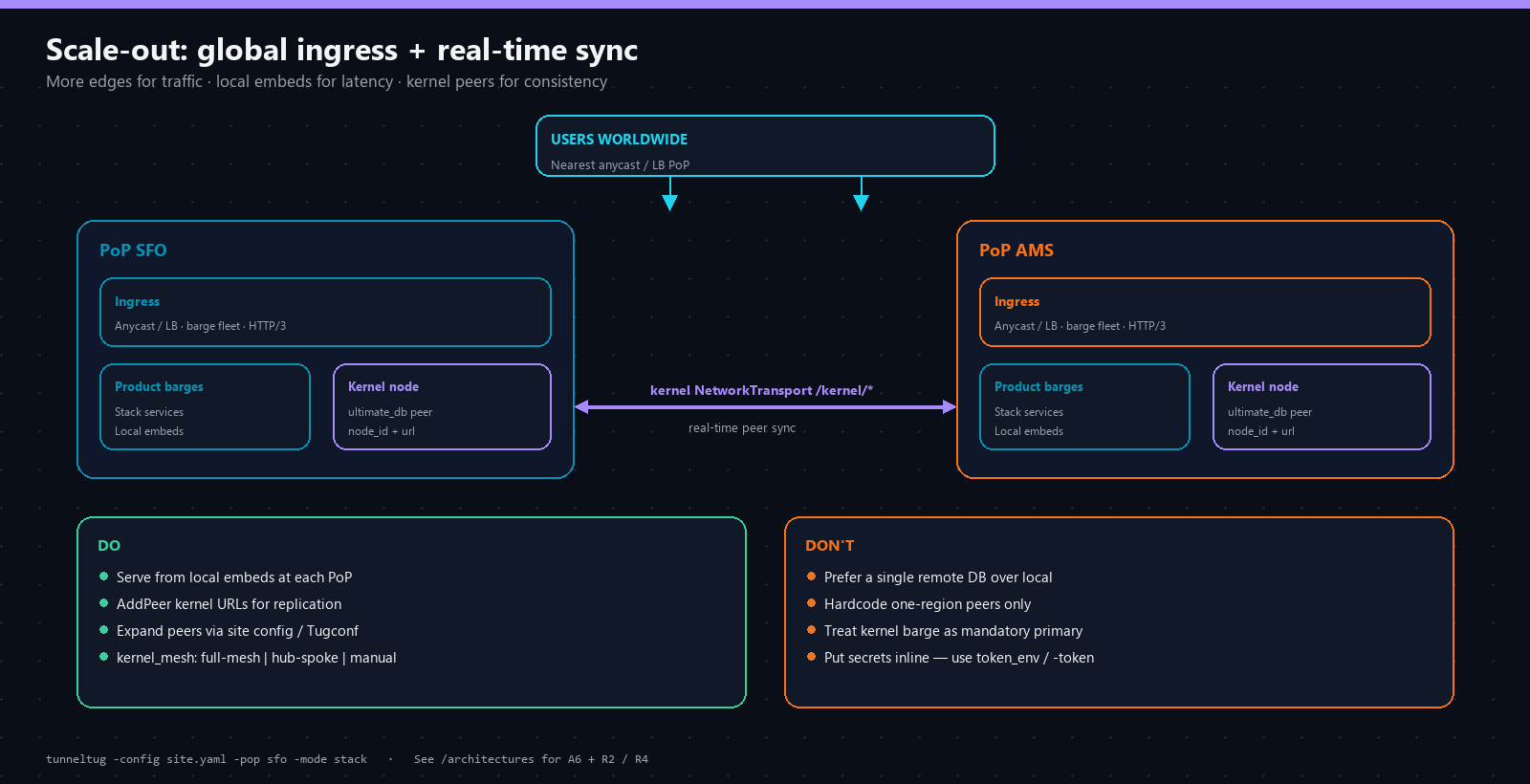
- Local embeds stay primary for serving at each PoP.
- ultimate_db / ultimate_keystore barges are replication peers (NetworkTransport /kernel/*).
- Stack injects HTTPS cluster DNS peer URLs (KERNEL_DB_REPLICATION_URL, …).
- Products AddPeer those URLs — they do not switch storage to remote-only.
- Site config expands peers from other PoPs' kernel.*.url.
Container hub + config builder
Public pull, authenticated push. On the hub each catalog image has a Configure modal: pick architecture, scale replicas, link services or multi-instance — preview YAML and Tugconf.
tunneltug -mode hub-publish -hub-products all -hub-tag latest \\
  -hub-dist /path/to/deploy/oci/dist \\
  -token \"$TUNNELTUG_TOKEN\"
SDF fleet manifests bind fleet shape + image digest so you can verify capacity is running the build you intended.
Also built in
- HTTP/3 public edge — QUIC ingress with Alt-Svc; WebSocket upgrades on H3 supported.
- Streaming ingress — reverse proxy tuned for SSE, long bodies, and WebSocket upgrades.
- ACME / Let's Encrypt — automatic certificates in -prod; see playbook 01.
- Product vhosts — co-host apex/www apps next to tunnel subdomains (-vhosts).
- Built-in mesh — secure_dns + secure_registrar private zone (*.tunneltug.tunnel).
- meshTLS — platform Mesh CA leaves for mesh FQDNs (WebAuthn / DBSC / SNI).
- Mesh agent gateway — secure-overlay QUIC+Noise for 0TrustOS/gonode (distinct from tunneltug ALPN).
- VPI stub — local resolver for private TLDs (.tunnel / .mesh / .social).
- Custom DNS / DoH — -dns YAML for private TLDs and domains with per-zone DoH resolvers.
- Snapshots — restore tunnel inventory after restarts (-snapshot-dir).
Ports
443  / -public       TCP HTTPS · UDP HTTP/3   Public ingress
9000 / -control       UDP QUIC                   Tunnel control channel
80                    TCP                        ACME HTTP-01 (-prod, when -acme-http)
4070 / -stack-dash    TCP                        Stack dashboard + /apps/{name}/ gateway
4073 / -mesh-tls-port TCP                        meshTLS HTTPS (operator auth + shell)
Security
- Cryptographic tunnel tokens only — mint with tunneltug -gen-token.
- Dashboard secrets are generated for you; never paste weak user-chosen tokens.
- Hub image push requires the same crypto token; pull is public.
- SDF fleet manifests bind fleet shape + image digest.
- WebAuthn / DBSC only on meshTLS FQDNs — never plain http:// or localhost for operator shell.
- Mesh CA leaves from the platform PKI path — TunnelTug does not invent a local CA.
- Anycast ROV + BGPsec fail-closed when security is enabled.
- MIT licensed — see the repository LICENSE.
Next steps
Architectures — deployment shapes A1–A10 and resilient designs R1–R5 with copyable YAML/Tugconf. Hub — browse images and open the config builder. Dashboard — mint a secret and create a tunnel. Playbooks — day-2 operations.
← Back to home · Architectures · Hub · Dashboard · GitHub · Full architectures doc